Setting up dbt State Preview
dbt State is natively available in dbt platform and locally in dbt Core v1.12+ and the dbt Fusion engine. It is also available as a plugin for older versions of dbt Core (1.7-1.11).
Once enabled, dbt State runs automatically on every dbt run or dbt build.
Before you begin:
- dbt State supports Snowflake, Databricks, BigQuery, and Redshift.
- dbt State requires authentication either through a dbt platform account, or a standalone account that's independent of dbt platform. For details on which option is right for you, refer to About dbt State. For pricing information, refer to dbt State usage and pricing.
Select the option that matches your setup:
- dbt platform
- dbt Core 1.12 / Fusion
- dbt Core 1.7–1.11
Prerequisite: You must be an admin in your dbt platform account.
To enable dbt State:
-
In your dbt platform account, click your account name in the lower-left corner above your username and click Account settings.
-
Under Settings, go to State.
-
Click Start your 30-day free trial.
Once started, you cannot pause the trial. After 30 days, you must add a credit card or enterprise contract to continue. For more information, refer to dbt State usage and pricing.
Extended trial for state-aware orchestration usersIf you're using state-aware orchestration prior to June 1, 2026, your dbt State trial will be extended until the billing period begins on September 1, 2026. If the extension isn’t applied to your account, contact your account team.
-
Review and agree to the terms of service.
-
Click Start 30-day trial.
-
Click Enable dbt State.
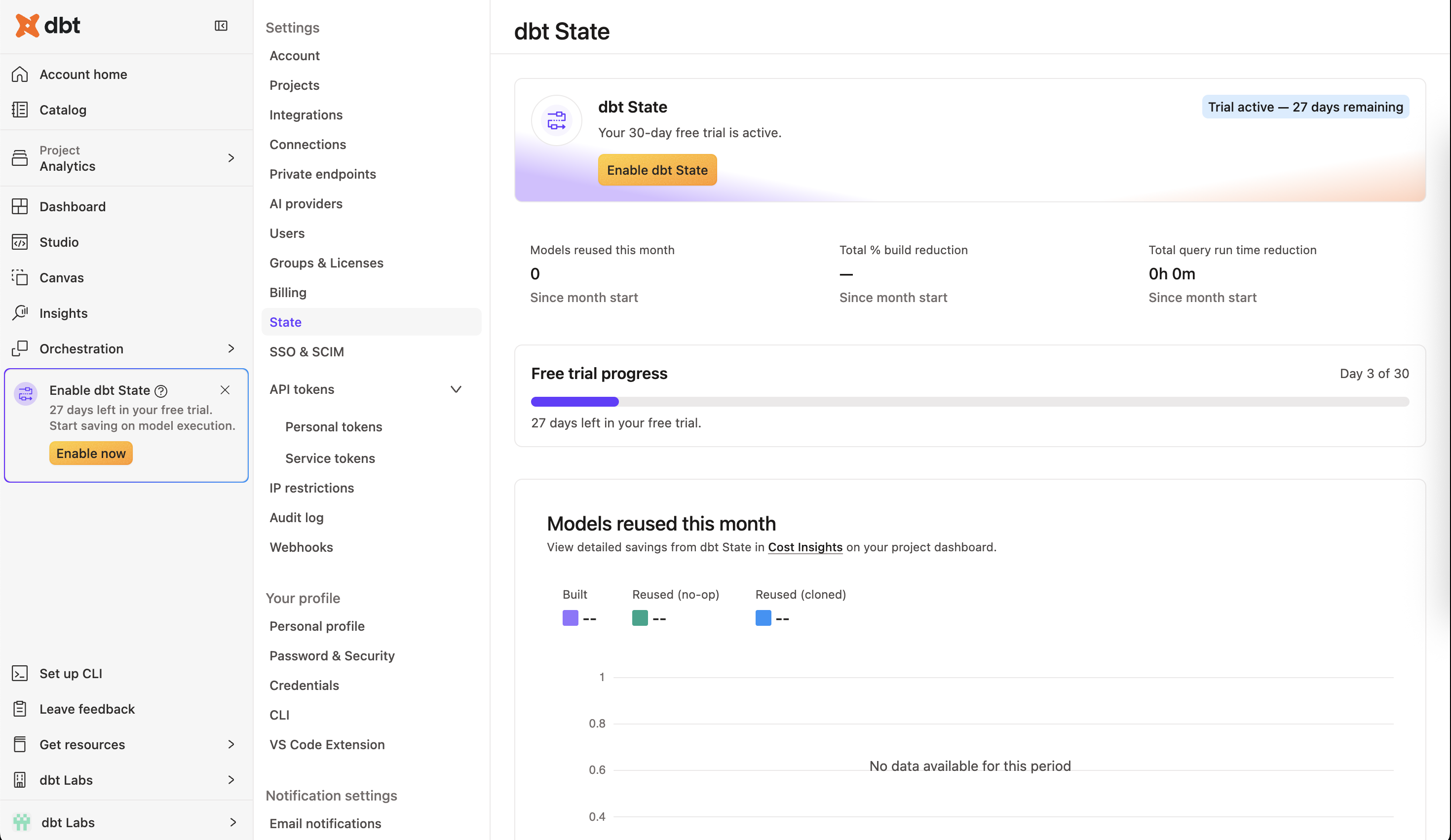 dbt State page
 -
In the Upgrade to dbt State page, select the jobs to enable dbt State for. You can either enable:
- By environment: Enables dbt State on all existing jobs within the selected environment at once. New deploy jobs created in that environment will have dbt State enabled automatically.
- By specific jobs: Enables dbt State on individual jobs. To enable it on additional jobs later, refer to Enabling dbt State on individual jobs.
-
Click Enable dbt State.
The dbt State page where you started your trial in step 3 displays how many days remain in your trial period alongside the following monthly data:
- Number of models reused
- Total % build reduction
- Total query run time reduction
Enabling dbt State on individual jobs
To enable dbt State on any job — whether already existing or newly created in an environment that doesn't have dbt State enabled:
- Go to Orchestration > Jobs.
- Select the job you want dbt State enabled for.
- Click Settings > Edit.
- In the Execution settings section of the job, select Enable dbt State.
- Click Save.
-
Navigate to your project:
cd to/your/project -
Log in to dbt State:
dbt loginThis opens a browser window where you can log in with your dbt platform account or the standalone dbt State app. For details on authentication behavior and how it affects
user_settings.yml, refer todbt login.If dbt State is already enabled on your dbt platform account, you'll be prompted to enable it on your machine. You can change this at any time by editing the settings file located at
~/.dbt/user_settings.yml. For more information about login behavior, refer todbt loginwith dbt State.
dbt State is now enabled and will run automatically on every dbt run or dbt build.
You can also enable or disable dbt State per run using CLI flags: --manage-state or --no-manage-state, or set the DBT_ENGINE_MANAGE_STATE environment variable.
To enable dbt State for everyone on your project, add manage_state: true to the flags: block in dbt_project.yml:
flags:
  manage_state: true
dbt State is available as a plugin for older versions of dbt Core (v1.7+). If you are running on dbt Core v1.9 or older, we encourage you to upgrade to a more recent version with ongoing support.
To install the plugin:
-
Navigate to your project:
cd to/your/project -
Create and activate a virtual environment:
python3 -m venv .venv
source .venv/bin/activate -
Install the dbt State plugin:
pip install dbt-state
dbt State is now enabled. The first time you execute dbt run or dbt build, a browser window opens where you can log in with your dbt platform account or the standalone dbt State app. After authenticating, dbt State runs automatically on every dbt run or dbt build.
The CLI flags --manage-state and --no-manage-state are not available in older dbt Core versions. Use the environment variable (DBT_ENGINE_ENABLE_STATE) or project flag (enable_state) to enable or disable dbt State.
dbt State works out of the box, but the following steps can help you get more value from it.
Configuring lag tolerance
Lag tolerance allows you to set a tolerance level for older data at the project, environment, or model level. We recommend starting with the following Jinja expression, which tolerates older data locally and requires fresher data in production. As you get a better feel for where adjustments make sense, you can tune individual models.
models:
  +state:
    lag_tolerance: "{{ '4h' if target.name == 'prod' else '7d' }}"
In this example, models in the prod target rebuild only when upstream data is more than 4 hours old. In all other environments, models wait 7 days before rebuilding.
For more details, refer to the lag_tolerance config reference.
Configuring deferral
By default, dbt State defers to your production environment. To customize which environment dbt defers to, use the defer_to_target config.
For the full list of available configs, see dbt State configs.
Inviting team members
The more team members you have using dbt State, the better it gets; more team members means more opportunities to clone existing nodes rather than rebuilding them.
- For standalone app users: Click the invite link in the upper-right corner of the Users page.
- For dbt platform users: Have your colleagues run
dbt loginafter dbt State is enabled on the account.
Debugging dbt State
If dbt State is behaving unexpectedly, you can prepend your run command with the DBT_ENGINE_MANAGE_STATE environment variable to isolate the issue:
DBT_ENGINE_MANAGE_STATE=1 dbt run --target dev --select "customers"
Related docs
- About dbt State
- CI/CD setup
- Configuring deferral
- dbt State configs
- Migrate from state-aware orchestration
- dbt State usage and pricing
Was this page helpful?
This site is protected by reCAPTCHA and the Google Privacy Policy and Terms of Service apply.